

Most operators in regulated health and wellness are used to running on ad accounts they don’t really see into. The accounts work, the ads run, the money moves — but the financial state, the daily compliance work, and the account-level health all sit somewhere they can’t reach without asking.
Scoreify clients run on a different setup. Every active client has a live dashboard at app.scoreify.io showing exactly what’s happening on every account, every day. The numbers we see are the numbers you see, refreshed daily, in one place.
What the dashboard shows
A live financial and operational view of every account running on Scoreify infrastructure. Five categories of information surface in the dashboard:
- Spend tracking — what’s been spent through each account today, this week, this month, against your prepaid balance
- Deposit balance and runway — how much is left and how many days of current spend velocity it covers
- Fee calculation in real time — the rate, the base, and the current owed amount, refreshed daily
- Certification and account status — LegitScript expiry, BM verification, HiVA tier, days protected
- Work logged daily — every policy check, account review, and compliance action the team runs against your account, with timestamps
This is what’s usually missing from agency-account relationships. Most providers operate in a different model — periodic reports, request-based reconciliation, account state shared on demand. The dashboard is built to replace all of that with live data the client can check whenever.
The account view
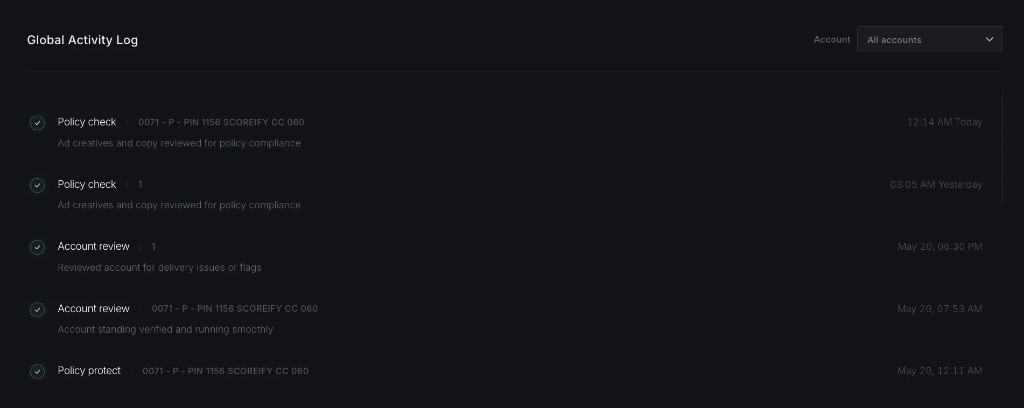
The account-level page shows verification status, HiVA tier, policy monitoring state, and days protected. A heatmap of every compliance action the team runs against your account makes the work visible — not as a summary, but day by day. The global activity log records every policy check, account review, and policy protect action with a timestamp.
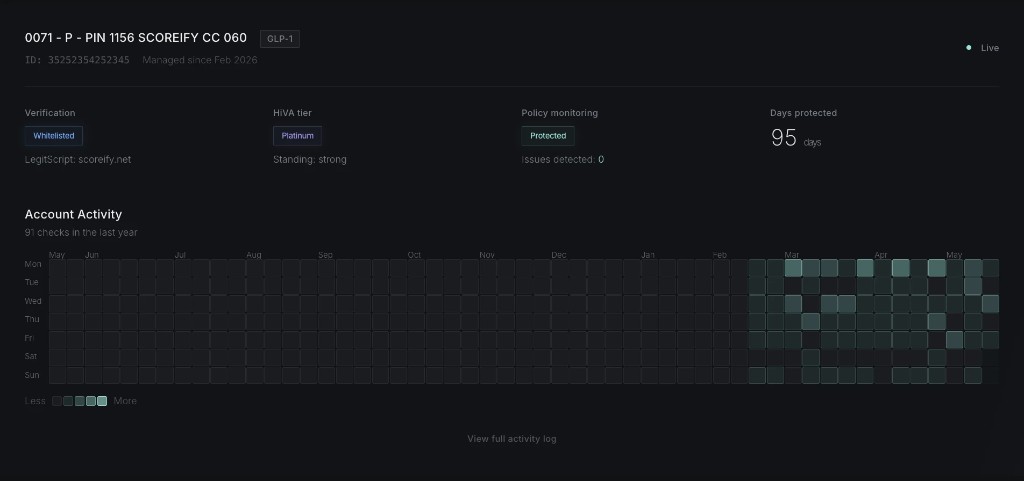
Operators using this view see exactly what’s running underneath their ads. When a policy check fires at 12:14 AM and an account review lands the next afternoon, the actions are logged where the client can see them.
The financial view
The wallet view shows your prepaid balance, last deposit, spend and fees over the last 30 days, a runway projection, and a month-by-month breakdown of spend against fee rate and total owed.
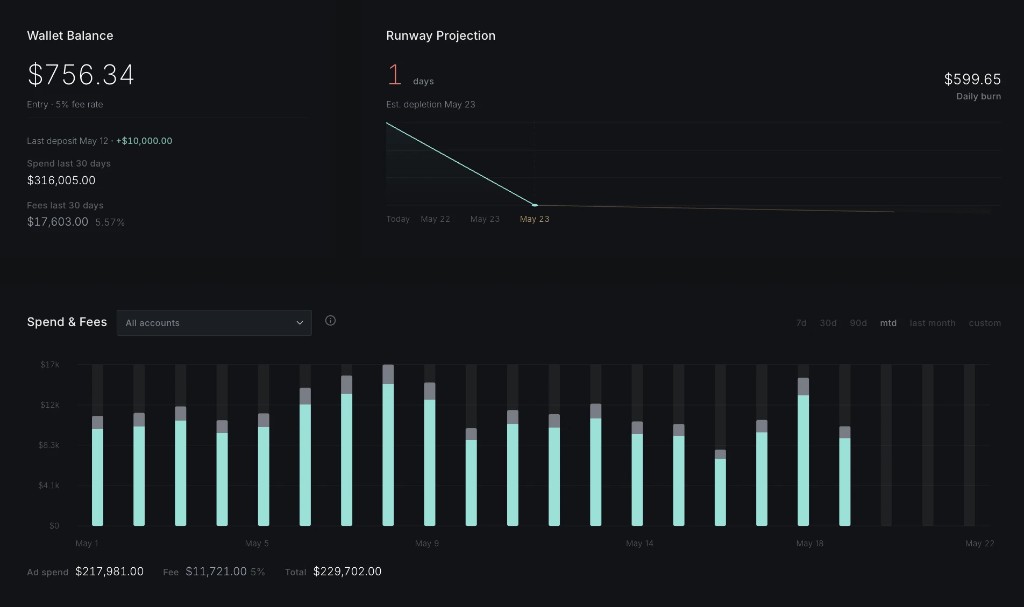
The math is exposed: the rate is fixed, the calculation base is visible, and the current owed amount refreshes daily. No separate report process. No screenshot-on-request. No quarterly reconciliation surprise.
Why we built it
Two reasons.
First, operators running real money through any infrastructure should be able to see the state of that infrastructure at any time. Building a dashboard that does this is not technically complex — it’s a deliberate product choice.
Second, the work Scoreify does on accounts every day isn’t visible from inside Ads Manager. Policy checks, account reviews, HiVA monitoring, restriction surveillance — none of it shows up where the client would normally look. The dashboard is where that work lives, so clients can see what they’re paying for.
The dashboard runs alongside every Scoreify infrastructure relationship. It’s not a paid add-on. It isn’t reserved for high-volume clients. It ships with every account. You see what we see, every day, in the same place.